

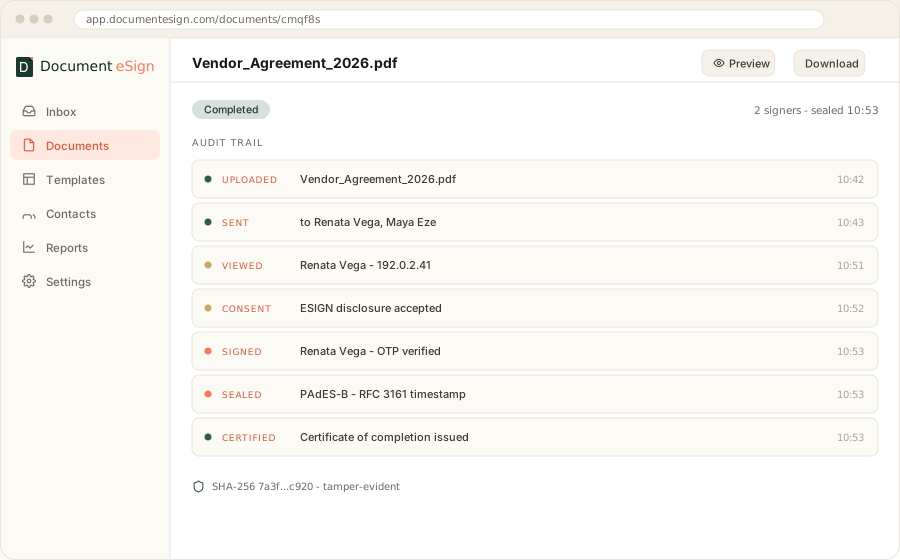
Vendor_Agreement_2026.pdf · 2 signers · Doc cmqf8s...zjcaa
- UploadedVendor_Agreement_2026.pdf10:42
- Sentto Renata Vega, Maya Eze10:43
- ViewedRenata · 192.0.2.4110:51
- ConsentESIGN disclosure accepted10:52
- SignedRenata Vega · OTP verified10:53
- SealedPAdES-B · TSA timestamp10:53
- 5,000+
- businesses signing since 2021
- 40+
- countries signing worldwide
- 30/mo
- free documents, every month
- Audit-grade
- trail on every signed document
See it work
What a free plan actually does
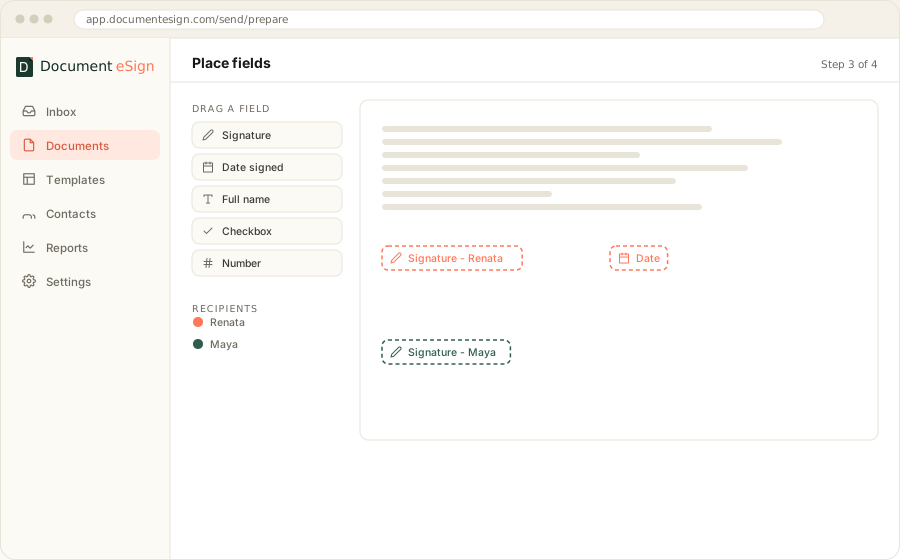
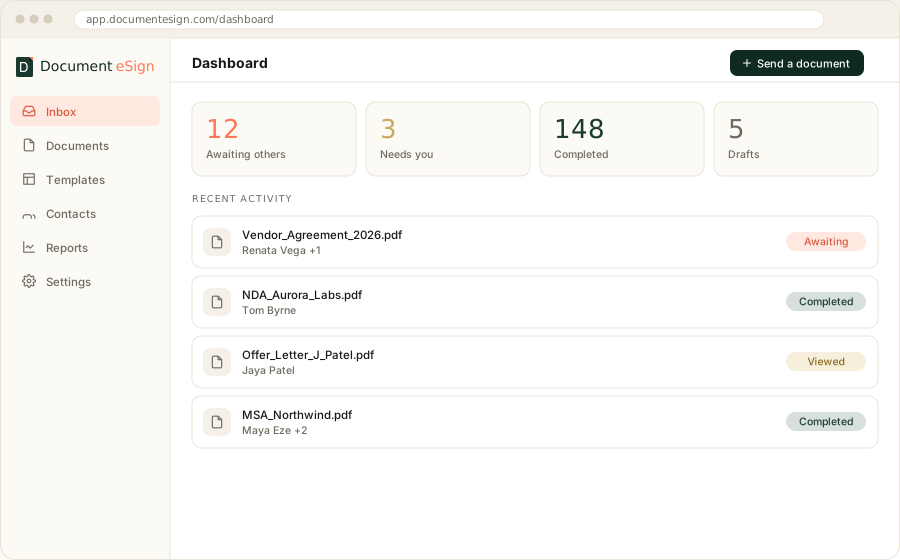
The whole journey, start to finish: upload, add signers, place fields, send, sign, and the sealed certificate at the end. This runs on the free plan.
No install
Browser and mobile, nothing to download
Signers need no account
They open a link and sign
Sealed on completion
PAdES with a trusted timestamp
Certificate included
Every event, timestamped
The short answer
Free electronic signature software lets you send and sign documents at no cost, usually with a monthly cap between 3 and 30 documents. The free tier is legally sufficient for most agreements under the ESIGN Act and eIDAS. What you give up is branding, identity checks, API access, and sometimes the audit trail itself.
01 · Definitions
What counts as free electronic signature software
Free e-signature software is a hosted tool that lets you upload a document, place signature and date fields on it, email it to signers, and get back a completed PDF with a record of who signed and when. No licence fee, no card. The catch is always volume, and occasionally evidence.
Three different things get sold under the word "free" and they are not interchangeable. Knowing which one you are looking at saves a lot of wasted setup.
A permanent free tier
A real plan that never expires, with a monthly document allowance. You can run a small business on one of these indefinitely. This is the only kind worth building a process around.
A time-limited trial
14 or 30 days of the paid product, marketed as free. Useful for evaluation, useless as a long-term answer. Watch for the ones that ask for a card up front and convert silently.
A free signing tool with no account
Draw a signature, drop it on a PDF, download. Fine for signing something sent to you. It produces no audit trail and no evidence of consent, so do not use it for anything you might need to enforce.
Most people searching for free document signing software want the first kind and end up trialling the second. If a pricing page will not tell you the monthly document cap without a signup, assume the cap is low.
02 · The fine print
Five limits that hide inside free e-signature plans
Vendors compete on the headline number and recover margin elsewhere. These are the five restrictions that actually change how you work, ranked by how quickly people run into them in practice.
The document cap is per sender, not per company
Five free documents a month sounds workable until you notice it is five for the whole account. Add a second person and you are effectively at two and a half each. Check whether the allowance is per seat or pooled before you invite anyone.
Templates are paywalled
This one costs the most time. If you send the same NDA forty times a year, a template turns a ten-minute job into a thirty-second one. Plenty of free tiers let you sign but not save a reusable layout, so you rebuild the field positions every single send.
The signing page carries the vendor's logo
Your client opens the email, sees somebody else's brand, and gets a moment of doubt about whether the message is genuine. For internal paperwork this is irrelevant. For a proposal to a new customer it is the whole first impression.
There is no audit trail
The one that matters legally. A signed PDF on its own is weak evidence. What makes it hold up is the record around it: opened at this time, from this IP, consented to electronic records, signed. Ask for a sample certificate of completion. If the vendor cannot produce one, keep looking.
Documents are deleted, or kept forever
Both directions are a problem. Some free tiers purge completed documents after 30 days, which is a compliance headache if you are meant to retain agreements for seven years. Others keep everything indefinitely with no deletion controls, which is a different compliance headache under GDPR. Retention policy is worth two minutes of reading before you commit.
03 · Comparison
How the free tiers compare on the things that matter
Four capabilities separate a usable free plan from a demo: monthly volume, reusable templates, a real audit trail, and whether you are asked for a card. Here is how the category generally splits, and where Document eSign sits.
| Capability | Typical free tier | Free PDF signer, no account | Document eSign free |
|---|---|---|---|
| Documents per month | 3 to 5 | Unlimited, self-sign only | 30 (max 10 per day) |
| Reusable templates | Usually paid | No | Included |
| Audit trail + certificate | Sometimes | No | Included |
| Tamper-evident PDF seal | Varies | No | PAdES with timestamp |
| Multiple signers, in order | Often limited to 1 | No | Included |
| Mobile signing | Yes | Varies | Yes, plus iOS and Android apps |
| Credit card to start | Often required | No | Not required |
| Your logo on the signing page | Paid | No | Paid |
Free tiers change often. Figures for Document eSign are current as of August 2026; verify others against the vendor's own pricing page before deciding.
04 · Our own product
Document eSign, the free plan we build and run
Angular Minds builds Document eSign, so this section is not neutral and we would rather say so up front. What follows is what the free plan does, described the same way we would describe it to a client evaluating it against anything else.
- 30
- documents a month, free forever
- $0
- card details to get started
- PAdES
- cryptographic seal on every completed PDF
- 14 days
- of the Business tier, no card, if you want more
What the free plan covers
- Send to several signers, in a set order or all at once
- Reusable templates for the documents you send repeatedly
- Signature, initials, date, text, checkbox and dropdown fields
- Certificate of completion with the full event log
- Self-signing for documents that only need your mark
- Signing on any phone browser, plus native iOS and Android apps
What needs a paid plan
- Your logo and colours on the signing page and emails
- Sending from your own domain rather than ours
- SMS and email OTP verification before a signer can open the document
- Bulk send, scheduled send, and automatic reminders
- IP restrictions, SSO, and multiple workspaces
- Automatic backup to Google Drive, Dropbox or OneDrive
No card · 30 documents a month · Cancel nothing, there is nothing to cancel
05 · Legality
Are free electronic signatures legally binding?
Yes. Price has nothing to do with enforceability. A signature collected on a free plan carries the same legal weight as one collected on a plan costing forty dollars a month, provided the software captures the same evidence. What varies is how easy that evidence is to produce later.
In the United States two laws govern this. The ESIGN Act of 2000 operates federally and UETA has been adopted by 49 states. Both say the same core thing: a contract cannot be denied legal effect purely because it was signed electronically. In the EU and UK, eIDAS does the equivalent job and adds a tiered model, where a simple electronic signature is admissible and an advanced or qualified one carries a higher presumption of validity.
Four conditions have to hold for any of it to work.
Intent to sign
The signer meant to sign. A drawn or typed signature applied deliberately covers this.
Consent to do business electronically
Usually a disclosure the signer accepts before opening the document. Free tiers that skip this step are the risky ones.
Attribution to the signer
Something ties the signature to a person: an email address, an IP, a verification code.
A retained, unaltered record
Both parties can get a copy, and the copy can be shown not to have changed since signing. This is what the PAdES seal is for.
Where electronic signatures are not accepted
A short list of documents still needs wet ink in most jurisdictions: wills and testamentary trusts, some family law filings such as divorce and adoption papers, certain property transfer deeds, and court orders. Rules differ by state and country, so check locally rather than assuming. Everything else, from an NDA to a lease to an employment offer, is fine electronically.
This is general information, not legal advice. For a specific agreement in a specific jurisdiction, ask a lawyer.
06 · The upgrade line
When free stops being the right answer
Four signals mean you have outgrown a free plan. None of them are about volume alone. A company sending twelve documents a month with its own branding and an OTP check has outgrown free; one sending forty plain internal forms has not.
A customer sees the document
The moment signing is part of your sales process rather than your admin, branding stops being cosmetic. Your logo, your sender address, your colours. It is the cheapest credibility you can buy.
You need to prove who signed, not just that someone did
Email possession is a weak identity claim. If the agreement is worth enough that a dispute is plausible, add SMS or email OTP before the document opens. This is the single biggest jump in evidential strength available.
Somebody is copy-pasting names into a form all day
Bulk send and templates with prefilled fields turn a morning into a minute. If a person on your team has a spreadsheet open next to the signing tool, you are paying for the free plan in salary.
Signing should happen inside your own product
When your application needs to generate an agreement and send it without a human opening a dashboard, you need an API rather than a plan. That is a different conversation, and it is the one below.
07 · Build instead of buy
When signing belongs inside your own product
Some companies should not be shopping for e-signature software at all. If your users sign things as part of using your product, a third-party dashboard is a detour. You want signing embedded, branded as you, and triggered by your own code.
Angular Minds has built this both ways: as a product of our own, and as embedded signing inside client platforms in insurance, lending and property. The engineering is more involved than it looks from the outside. Four parts do most of the work.
Field mapping on the PDF
Turning a flat document into coordinates a signer can interact with, which stays correct across page sizes, rotations and scanned originals.
The signing session
A tokenised, expiring, single-purpose link that works on a phone, survives a dropped connection, and cannot be replayed by anyone who forwards the email.
Sealing and timestamping
Applying a PAdES signature with a trusted timestamp so the finished file proves it has not been altered since the moment of signing.
The evidence log
An append-only record of every view, consent and signature, exportable as a certificate that a court or auditor will accept without explanation.
Read how we did it end to end in the Document eSign case study, or see the integration options on our e-signature API development page.
Frequently asked questions
Short answers to what people ask before picking a free e-signature tool.
Is free electronic signature software legally binding?
Yes, in most cases. Under the US ESIGN Act and UETA, and under eIDAS in the EU, an electronic signature is not invalidated because it is electronic. What matters is intent to sign, consent to do business electronically, and a record linking the signature to the signer. Free tiers that capture an audit trail satisfy this.
How many documents can you send on a free e-signature plan?
It varies widely. Most free tiers cap you at 3 to 5 documents per month, and some limit you to a lifetime total rather than a monthly allowance. Document eSign is the more generous end of the range at 30 documents a month with a 10 per day ceiling, and it does not ask for a card.
What is the difference between an electronic signature and a digital signature?
An electronic signature is the legal act of signing, such as typing a name or drawing a mark. A digital signature is the cryptographic method used to seal the file so tampering is detectable. Good software applies a digital signature underneath the electronic one, usually as a PAdES seal on the PDF.
Do free e-signature plans include an audit trail?
Not always, and this is the limit that matters most. An audit trail records who opened the document, from which IP, when they consented, and when they signed. Without it you have a signed PDF but weak evidence. Check for a certificate of completion before committing to any free tier.
When should a business pay for e-signature software?
Pay when you need one of four things: volume beyond the free cap, your own branding on the signing experience, identity verification such as SMS or email OTP, or an API to trigger signatures from your own product. Until you hit one of those, a free plan is genuinely sufficient.
Can you build your own electronic signature system?
Yes, and it makes sense when signing is a core part of your product rather than an office task. The build involves PDF field mapping, a signing session, tamper-evident sealing, and an evidence log. Angular Minds builds these, and also runs Document eSign as a working reference implementation.
Start free, or have us build signing into your product
Document eSign covers 30 documents a month at no cost. If signing needs to live inside your own application, that is what our engineering team does.
Keep reading
Solution
Looking for an alternative to the market leader
Where the price difference actually comes from, and what you give up.
Solution
E-signature API development
Embedding signing into your own platform, and what the build involves.
Case study
How we built Document eSign
Architecture, sealing, and the decisions behind a working e-signature platform.