

Monthly cost, 25 people
Only 6 of them send documents regularly
25 x $45 typical business tier
Unlimited users, one price
Illustrative. Per-seat figure uses a $45 business-tier list price; check current vendor pricing before quoting.
The same job, done
Watch the flow you are already paying for
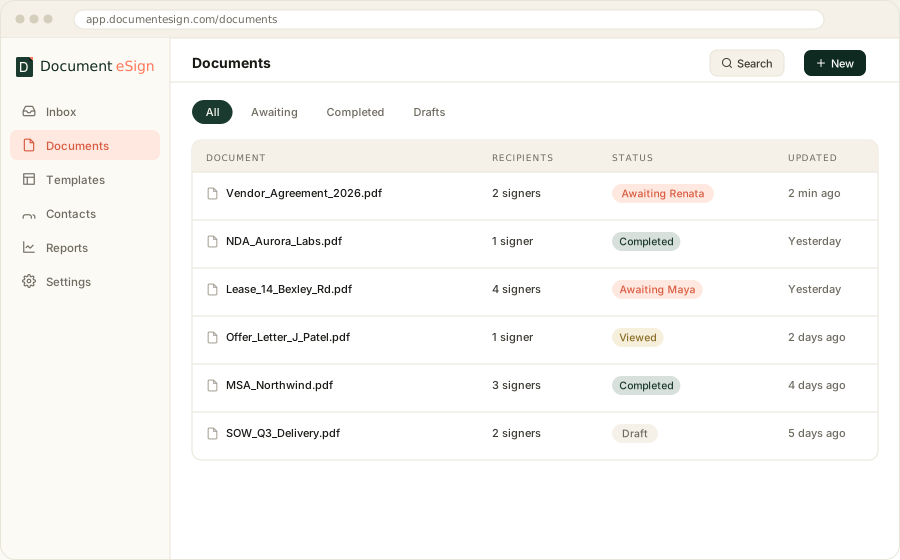
Upload, add signers, place fields, send, sign, seal. If this looks familiar, that is the point. The signing is not what you are switching for.
The short answer
A DocuSign alternative makes sense when your cost is driven by seats rather than signatures. The signing experience, the legal standing, and the audit trail are equivalent across serious providers. What differs is pricing structure, how many integrations exist out of the box, and how deep the enterprise controls go.
01 · Motivation
Why teams start looking for a DocuSign alternative
Almost nobody switches because signing went wrong. In the conversations we have with clients, the trigger is nearly always a renewal quote that grew faster than usage did. Four patterns come up repeatedly.
Seats grew, sending did not
You bought eight seats. Now you have twenty-six people in the workspace because everyone needs to see the archive, and you are billed for all of them. Meanwhile the same four people send 90 percent of the documents.
The envelope allowance ran out in a busy quarter
One heavy month during a hiring push or a renewal cycle pushes you over the cap. The upgrade is annual. You spend the next eleven months paying for a ceiling you touched once.
Features you need sit two tiers up
Bulk send, custom branding, or SMS verification turn out to be on the plan above the one you are on. Individually each is a small thing. Together they double the bill.
You only ever used a quarter of it
Large platforms carry a lot of surface area: CLM, notary, payments, hundreds of connectors. If your actual workflow is upload, send, countersign, file, you are funding a product much bigger than your problem.
02 · Cost structure
Where the price difference actually comes from
Not from cheaper signatures. From a different billing shape. Per-seat pricing charges for access; flat pricing charges for the workspace. Below about eight users those two models land in the same place. Above it they separate fast.
| Team size | Per-seat at $45/user | Document eSign | Monthly difference |
|---|---|---|---|
| 1 user | $45 | $20 (Business) | $25 |
| 5 users | $225 | $100 | $125 |
| 10 users | $450 | $99 (Ultimate, flat) | $351 |
| 25 users | $1,125 | $99 (Ultimate, flat) | $1,026 |
| 100 users | $4,500 | $99 (Ultimate, flat) | $4,401 |
Document eSign list pricing as of August 2026, billed monthly: Free, Growth $12/user, Business $20/user, Ultimate $99 flat for unlimited users. Annual billing is lower. The per-seat column uses a representative $45 business-tier price for illustration; confirm current vendor pricing before making a decision.
The crossover point
Flat pricing wins from roughly the fifth or sixth user onward. Below that, compare on features rather than cost, because the monthly difference is smaller than the time you will spend switching. Above twenty users the gap is large enough that it funds a headcount.
03 · Feature by feature
What matches, and what does not
The core signing workflow is close to identical across the category, because the legal requirements are identical. Differences show up at the edges: integration breadth, enterprise governance, and how much you pay to reach the middle tier.
| Capability | DocuSign | Document eSign |
|---|---|---|
| Legally binding under ESIGN, UETA, eIDAS | Yes | Yes |
| Audit trail + certificate of completion | Yes | Yes |
| Tamper-evident PDF seal | Yes | PAdES with TSA timestamp |
| Reusable templates | Paid tiers | Free plan and up |
| Free plan | Trial only | 30 documents a month, permanent |
| Pricing model | Per user, per month | Per user, or flat for unlimited users |
| Envelope or volume cap on paid tiers | Yes, per plan | No cap on paid tiers |
| Custom branding on signing page | Mid tier and up | Business tier |
| SMS / email OTP verification | Add-on or higher tier | Business tier |
| Bulk send | Higher tier | Business tier |
| Native mobile apps | Yes | iOS and Android |
| Prebuilt integration catalogue | Several hundred | Cloud storage, plus API |
| Contract lifecycle management | Full CLM suite | Not offered |
| Remote online notarisation | Yes | Not offered |
04 · The honest part
Where DocuSign is the better choice
We build Document eSign, so treat everything above with the scepticism that deserves. Here is the part most comparison pages leave out: four situations where we would tell you to stay where you are.
You need contract lifecycle management
Clause libraries, negotiation redlining, obligation tracking and renewal alerts are a different product category. We do signing. If your legal team lives in CLM, moving signing out of it creates more work than it saves.
Your workflow depends on a specific prebuilt connector
Hundreds of native integrations is a real advantage. If your process runs through a deep Salesforce or Workday integration that somebody already configured, replacing it with API work is a project, not a switch.
You need remote online notarisation
Commissioned notaries joining a recorded signing session, with state-by-state compliance, is a regulated capability we do not offer. If you notarise documents regularly, this alone settles it.
Procurement requires the incumbent
Some enterprise buyers have a vendor list, a signed MSA, and a security review that took nine months. The cost saving rarely justifies restarting that process. This is a real constraint and it is fine.
If none of those four apply, the switch is mostly upside. If two or more apply, stay.
05 · Switching
What actually moves when you switch
Less than people fear, and it takes about an afternoon for a typical small team. There is no data migration in the usual sense, because signed documents are just PDFs and templates are field coordinates. Four steps cover it.
- 1
Export your completed documents first
Download every signed PDF and its certificate of completion before the subscription lapses. Access to the archive typically ends with the account. This is the one step that is genuinely hard to undo.
- 2
Rebuild your templates
Field positions do not transfer between vendors. Re-upload the source document and place the fields again. Most teams have between three and ten templates that matter, and each takes a few minutes.
- 3
Run both in parallel for one cycle
Keep the old account alive until the current month's in-flight documents complete. Nobody wants to chase a signer whose link died mid-migration.
- 4
Point your automations at the new API
If Zapier, a CRM trigger or your own backend kicks off documents, this is the only engineering work involved. For anything non-trivial, our team can do the integration rather than leaving it with you.
Already-signed documents stay valid. Enforceability attaches to the signature and its evidence, not to the vendor's continued existence. A contract signed elsewhere in 2023 is exactly as binding after you switch.
06 · Third option
The option nobody lists: build it into your product
If your customers sign as part of using your software, swapping one dashboard for another misses the point. A lender, an insurer or a property platform wants signing to happen inside its own flow, under its own brand, triggered by its own code.
Angular Minds does this work. We built Document eSign from nothing, which means the sealing, the audit log and the signing session are things we have implemented rather than integrated. That experience transfers directly to embedding signing in a client platform.
Two routes, depending on how much you want to own:
Embed and white-label
Use Document eSign underneath, present it as yours. Fastest route to a signing experience your users never leave.
Build it in-house
Your infrastructure, your data residency, your roadmap. Slower and more expensive up front, and the right call when signing is central to the product.
More detail on both in e-signature API development.
Frequently asked questions
The questions that come up in every switching conversation.
What is the best DocuSign alternative for small business?
For teams under about 15 people, look for a plan that includes templates and an audit trail at the entry tier rather than gating them behind a business plan. Document eSign starts free at 30 documents a month, and its paid tiers begin at 12 dollars per user per month with templates included.
Is a DocuSign alternative as legally valid?
Yes. Legal validity comes from the ESIGN Act, UETA and eIDAS, not from the vendor. Any provider that captures intent to sign, consent to electronic records, attribution to the signer, and a tamper-evident retained copy produces an equally enforceable signature.
Why is DocuSign expensive?
Two structural reasons. Pricing is per user per month, so cost scales with headcount even when most of those people sign rarely. And envelope allowances are capped per plan, so occasional heavy months push you into an upgrade you keep paying for afterwards.
Can I move my existing templates to another e-signature provider?
Templates do not transfer automatically between providers because field coordinates are stored in each vendor's own format. You re-upload the source document and place the fields again. For most teams that is under an hour of work across their whole template library.
What happens to documents already signed in DocuSign?
They stay valid and enforceable regardless of what you use next. Download the completed PDFs and their certificates of completion before you close the account, since access to the archive usually ends when the subscription does. Store them wherever you keep signed agreements.
Does a cheaper e-signature tool mean weaker security?
Not necessarily. Check for the specifics rather than the price: TLS in transit, AES-256 at rest, a PAdES seal with a trusted timestamp on the finished PDF, and an append-only audit log. Those are the controls that matter, and they are not expensive to implement well.
Try it before you cancel anything
Rebuild one template, send one document, compare the certificate of completion against the one you have now. Thirty minutes tells you more than any comparison table.
Keep reading
Solution
Free electronic signature software
What the free tiers really include, and where the limits hide.
Solution
E-signature API development
Embedding signing into your own platform.
Case study
How we built Document eSign
Architecture, sealing, and the decisions behind the platform.
DocuSign is a trademark of DocuSign, Inc. Angular Minds is not affiliated with, endorsed by, or sponsored by DocuSign. Comparisons reflect publicly available information as of August 2026 and are provided for evaluation purposes.