

// Representative shape. Field names align to the real
// domain model so this stays accurate at launch.

const envelope = await esign.documents.create(({
  file: pdfBuffer,
  subject: "Vendor agreement for signature",
  recipients: [
    { email: "renata@northwind.co", role: "signer", order: 1 },
    { email: "maya@acme.io",      role: "signer", order: 2
  ],
  fields: [
    { type: "signature", recipient: 1, page: 3, x: 72, y: 540 },
    { type: "date",      recipient: 1, page: 3, x: 320, y: 540
  ],
  verification: { method: "email_otp" },
  webhookUrl: "https://api.yourapp.com/hooks/esign"
});

// -> { id, status: "sent", signingUrls: [...] }
// Embed signingUrls[0] in an iframe and the signer
// never leaves your application.
What the API drives
One call, and this whole flow runs
The demo alongside is the sender and signer journey your code triggers. In an embedded integration your users never see a dashboard at all: they stay inside your product and the signing view loads in an iframe.
You call, we route
One request creates the envelope, places fields and dispatches to signers in order.
Verification before open
Email or SMS OTP gates the document, set per recipient at create time.
Webhooks on every state change
Viewed, signed, declined, sealed. Retried with backoff so a brief outage loses nothing.
Sealed file returned
PAdES-signed PDF plus the certificate, fetched or pushed to your storage.
The short answer
An e-signature API lets your application create, send and complete signature requests in code, with no dashboard in the loop. The integration itself is a few endpoints. The engineering that matters is everything around it: field mapping that survives odd page sizes, a signing session that works on a phone, and an audit trail that holds up.
01 · Engagements
Four ways we get signing into your product
Which one fits depends on how central signing is to what you sell, and how much of the stack you want to own. Most clients arrive assuming they need the fourth and leave with the first.
Embedded signing
Your users sign inside your application, in an iframe or a native view. No redirect to a third-party page, no confusing change of brand mid-flow.
Typical: 4 to 8 weeks
White-label platform
Document eSign underneath, your brand on top, including the signing page, the emails and the sender domain. The fastest route to offering signing as part of your own product.
Typical: 3 to 6 weeks
Custom build, your infrastructure
A signature system inside your own cloud, your own database, your own region. For regulated clients where documents cannot leave a jurisdiction, or where signing volume makes per-document pricing untenable.
Typical: 12 to 20 weeks
Migration off an existing provider
Re-mapping templates, re-pointing webhooks, exporting the signed archive with its certificates, and cutting over without breaking documents already in flight.
Typical: 2 to 5 weeks
02 · Architecture
What an e-signature system is actually made of
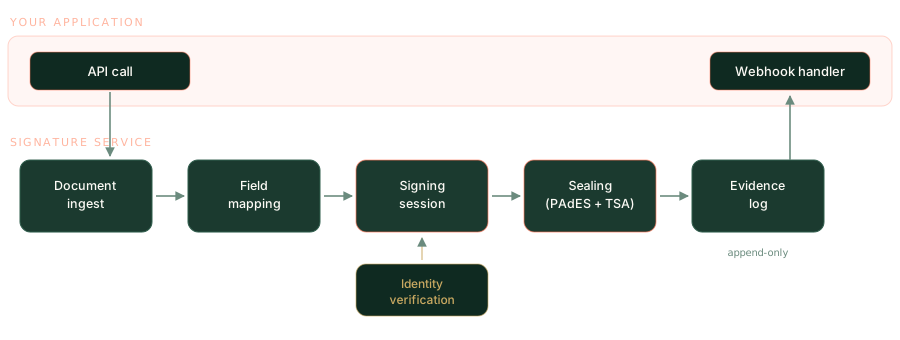
From the outside it looks like emailing a PDF. Underneath there are six components, and four of them are where projects go wrong. This is the shape we build to, drawn from what runs in Document eSign today.
Document ingest
Accepting PDF, DOCX and scans, normalising to a consistent PDF, and flattening existing form fields so they cannot be edited after signing.
Field mapping
Coordinates that hold up across A4 and Letter, rotated pages, and documents whose page count changes when the source template is edited. Quietly the hardest part.
Signing session
A single-use, expiring, tokenised link. Resumable if the connection drops, unusable by anyone who receives a forwarded email, and touch-accurate on a phone.
Identity verification
Layered by risk: email possession, access code, SMS or email OTP, knowledge-based questions, or a government ID check. Each step trades friction for evidence.
Sealing
A PAdES signature with a trusted timestamp from a TSA, applied once every signer is done, so tampering afterwards is visible in any standard PDF reader.
Evidence log
Append-only, hash-chained, exportable as a certificate of completion that an auditor or a court will accept without a walkthrough.
03 · The decision
Build your own, or integrate an existing API
Integrate if signing supports your product. Build if signing is your product. That single line settles most cases, and we will say so on the first call even though the build engagement is the bigger contract.
| Consideration | Integrate an API | Build in-house |
|---|---|---|
| Time to production | 2 to 8 weeks | 12 to 20 weeks |
| Cost at 5,000 docs a year | Clearly lower | Hard to justify |
| Cost at 500,000 docs a year | Per-document pricing bites | Clearly lower |
| Data residency control | Vendor regions only | Complete |
| Compliance burden | Mostly the vendor's | Entirely yours |
| Unusual signing flows | Limited to what the API models | Anything |
| Ongoing maintenance | Minimal | A permanent commitment |
Our rule of thumb
Under roughly 50,000 documents a year, integrate. Above it, model both properly, because per-document pricing compounds and an in-house build starts paying for itself. Data residency requirements override the maths entirely: if documents legally cannot leave a region your vendor does not operate in, the decision is already made.
04 · How we work
Our e-signature integration process
Five stages, with a working signature in a staging environment by the end of week two on most projects. We front-load the document audit because that is where the surprises live.
- 01
Document and workflow audit
We take your real documents, not samples. Page sizes, scanned originals, conditional clauses, who signs in what order, what happens when someone declines. Most scope surprises surface here rather than in week six.
- 02
Compliance and identity model
Which regime applies, what evidence you need if an agreement is challenged, and how much verification friction the business will accept. This decides the architecture, so it comes before any code.
- 03
Integration build
Endpoints, webhook consumers, template field mapping, and the embedded signing view inside your UI. Delivered in two-week increments against a staging environment you can use.
- 04
Evidence testing
We try to break it. Tamper with a sealed PDF and confirm the seal reports invalid. Replay an expired signing link. Sign on an old Android browser. Produce the certificate and read it as if we were opposing counsel.
- 05
Cutover and handover
Parallel running while in-flight documents complete, monitoring on the webhook consumer, and documentation your own team can maintain against. We would rather not be a dependency.
05 · Technology
What we build e-signature systems with
This is the stack running Document eSign in production today, handling document sealing, email delivery and the audit log. We adapt to your existing stack on client projects; this is what we reach for on a clean sheet.
PDF and cryptography
pdf-lib · PAdES-B · RFC 3161 TSA · SHA-256 · X.509
Backend
Node.js · Fastify · TypeScript · Prisma · PostgreSQL
Async and jobs
BullMQ · Redis · webhook retry with backoff
Frontend
React · Next.js · Angular · Tailwind · React Native
Infrastructure
AWS · S3 with SSE · Docker · Terraform · CloudFront
Delivery and identity
AWS SES · Twilio · SAML and OIDC SSO
06 · Where this lands
Industries where embedded signing pays for itself fastest
Embedded signing earns its cost wherever a signature sits between a customer and the thing they came to do. Every extra step in that gap costs conversions, which is why these five come up most often.
Lending and fintech
Loan agreements and mandates signed in the application flow, with OTP verification and a hard evidence trail for the regulator.
Insurance
Policy documents and claim forms generated per customer, signed without a broker rekeying anything into a separate tool.
Property and rentals
Leases and disclosures with many signers and a fixed order, where the audit trail matters more than anywhere else.
HR and staffing platforms
Offer letters and onboarding packs sent in bulk from the ATS, with countersigning and retention rules built in.
Healthcare
Consent forms captured at intake, on a tablet in the room or ahead of the appointment, with strict retention controls.
B2B SaaS
Order forms and MSAs triggered from the CRM when a deal moves stage, so nobody chases a PDF over email.
07 · Proof
We run our own e-signature platform in production
Most agencies offering e-signature integration have configured somebody else's SDK. Angular Minds built Document eSign end to end and operates it for paying customers: the sealing pipeline, the signing session, the audit log, the delivery infrastructure.
That matters when something goes wrong at 11pm. Debugging a broken seal or a signer whose link expired mid-flow is a very different exercise if your team has only ever called the API from the outside.
Frequently asked questions
What engineering leads ask before scoping an integration.
What does an e-signature API do?
It lets your own software create a signing request, place fields on a document, send it to signers, and receive the completed file plus its audit trail, all without anyone opening a separate dashboard. Your application stays the interface; signing becomes a background step.
How long does an e-signature API integration take?
A straightforward integration where you send a fixed template to one signer takes about two to three weeks including testing. Embedded signing inside your own UI, with multiple signers, conditional fields and webhook-driven state, is usually six to ten weeks.
Should we build our own e-signature system or integrate one?
Integrate if signing supports your product. Build if signing is your product. The dividing line is usually data residency, volume economics, or a signing flow so specific that no vendor models it. Below roughly 50,000 documents a year, integration almost always wins on cost.
What is PAdES and why does it matter for an e-signature API?
PAdES is the PDF Advanced Electronic Signatures standard. It embeds a cryptographic signature and a trusted timestamp into the PDF itself, so any later modification breaks the seal visibly. Without it you have a picture of a signature on a file anyone could edit.
Can you migrate us off an existing e-signature provider?
Yes. The work is usually re-mapping template field coordinates, re-pointing webhook consumers, and exporting the completed-document archive with its certificates before the old subscription ends. Signed documents remain enforceable regardless of which provider you move to.
How do you handle signer identity verification?
Layered by risk. Email possession is the baseline. Above that: an access code shared out of band, SMS or email OTP before the document opens, knowledge-based questions, or government ID checks through a third-party provider. Each step raises evidential strength and adds friction.
Bring us your documents, not a spec
Send three real documents and describe who signs them in what order. We will come back with an architecture, a build-versus-integrate recommendation, and a timeline.
Keep reading
Case study
How we built Document eSign
The architecture and the decisions behind it.
Solution
DocuSign alternative
Where the cost difference comes from, honestly.
Solution
Free electronic signature software
What the free tiers cover, and the point where an API earns its keep.
Blog
Document workflow automation
Where signing fits in a wider automated process.