






Real Estate12 min read

    How a USA-Based Real Estate Company Cut Reporting Time 40-50% with Live Podio Dashboards

    A US-based real estate company ran every lead, appointment, contract, rehab and closing through Podio, yet nobody could quickly answer a simple question: how did we do this week? Six months later, a live analytics layer on top of the CRM shows every team its numbers in under a second, and the company spends 40 to 50% less time on reporting and data checks. Here is how it was built, and what it taught us.

    Client
    US-based real estate company
    Business
    Property acquisitions and dispositions
    Engagement
    6 months, full-stack modernization
    Team
    4 engineers and 1 designer
    Integration
    14 Podio apps, synced live
    Status
    Live in production
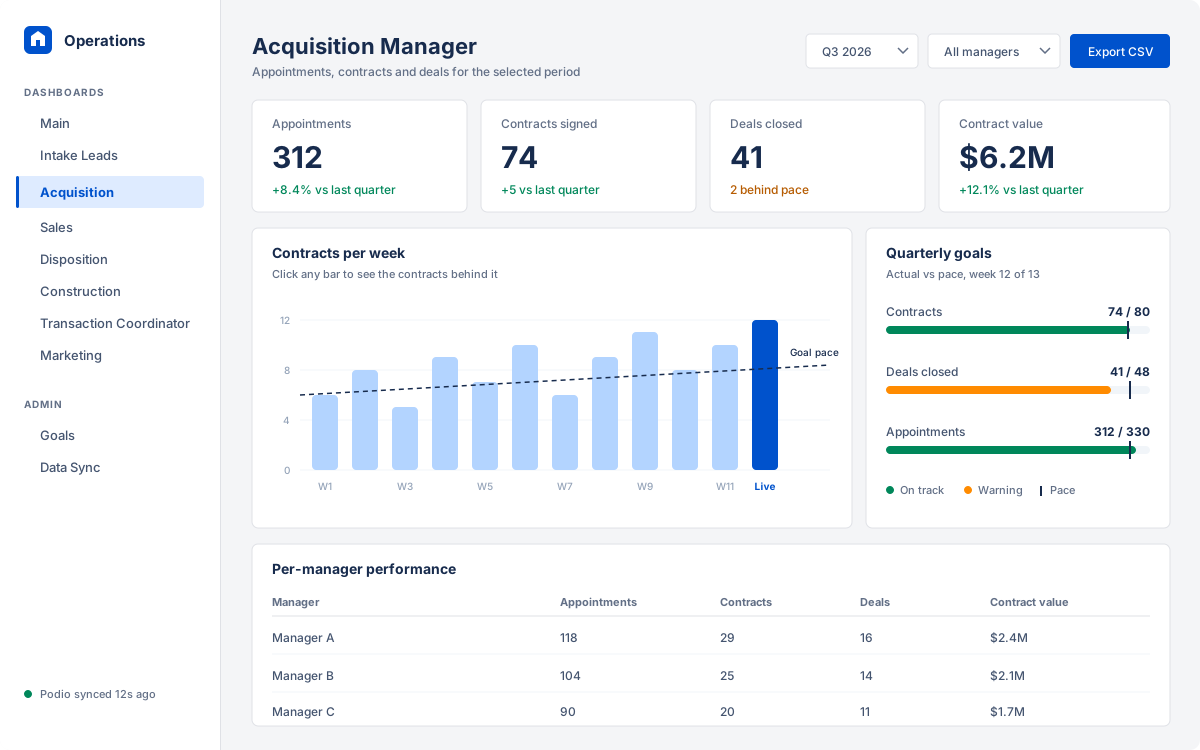
    Acquisition Manager dashboard showing appointment, contract, deal and contract value KPIs, a weekly contracts chart against goal pace, quarterly goal progress and a per-manager table.
    The Acquisition Manager dashboard, recreated with sample data.
    Less time on reporting
    40-50%
    Across reporting and data checks, per the client
    Podio edit to dashboard
    < 1 min
    Webhook-driven, reconciled nightly
    Dashboard load time
    < 1 s
    Read from a MongoDB mirror, not Podio
    Role-based dashboards
    8
    One per function, intake to closing

    Summary

    The client buys and sells residential property at volume. Intake, acquisitions, sales, construction, transaction coordination and marketing all work inside a Podio CRM, and over the years that CRM had become the most accurate record of how the business runs.

    Getting answers out of it was the problem. Weekly numbers were assembled by hand from Podio views and exports, two teams rarely agreed on the same figure, and two aging applications built around the CRM were getting expensive to change.

    Over six months, a team of four engineers and one designer at Angular Minds merged both applications into one monorepo, carried every proven calculation across, and put a MongoDB mirror of all 14 Podio apps underneath. Dashboards read from that mirror instead of Podio. That is why they load in under a second, and every number on screen can be clicked through to the records behind it.

    The challenge: plenty of data, very little visibility

    Podio is very good at running a workflow. It was never designed for cross-team analytics or week-over-week trends, and the business had outgrown the workarounds.

    No single source of truth

    Performance data lived in Podio views, CSV exports and personal spreadsheets. Meetings started with an argument about whose number was right.

    Reporting by hand, every week

    The weekly measurables and quarterly goals were compiled manually. Slow, easy to get wrong, and dependent on whoever knew which export to pull.

    Two legacy codebases

    A separate frontend and backend had grown organically around the company's workflows. The logic inside was valuable. Everything around it was costly to maintain.

    Metrics nobody fully trusted

    Each team counted "deals", "contracts" and "qualified leads" slightly differently. Small differences, but enough to stall decisions.

    Sound familiar? Signs your CRM has outgrown its built-in reports

    • Someone spends hours every week exporting and merging data before a meeting.
    • Two people pull the same metric and get two different answers.
    • You can see this week, but comparing it with last quarter means another spreadsheet.
    • Reports slow down or time out as record counts grow.
    • Changing a KPI definition needs a developer and a deploy.

    Ticked two or more? A synced analytics layer is probably worth a look.

    When a custom analytics layer makes sense, and when it doesn't

    A custom build is not always the right call. Here is the honest trade-off between the three usual ways to report on top of a CRM like Podio.

    OptionWorks well whenBreaks down when
    Built-in CRM views and reportsOne team, simple counts, and nobody needs history beyond the current filter.Metrics span several apps, you need week-over-week trends, or teams define the same KPI differently.
    Exports to spreadsheetsA one-off analysis, or a small team with a patient analyst.The report is weekly, several people edit copies, and numbers have to be defended in a meeting.
    A synced analytics layer with custom dashboardsMany roles need different views of the same data, history matters, and every number must trace back to a record.Volumes are tiny and the questions rarely change. The build and upkeep will not pay for themselves.

    This client sat firmly in the third row: eight roles, 14 Podio apps feeding shared metrics, and a weekly leadership review that depended on the numbers being right.

    How the platform works

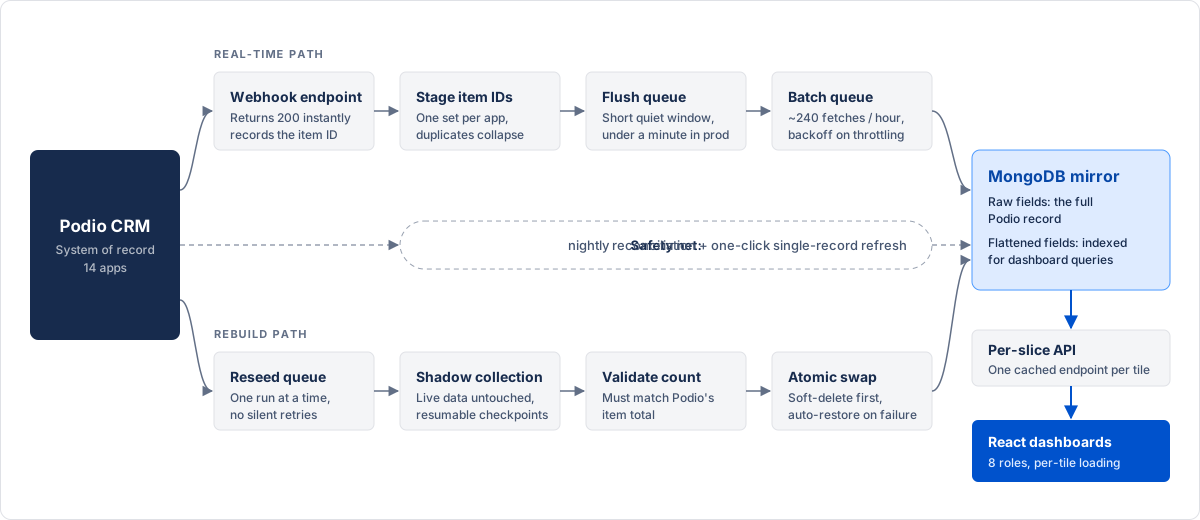
    Podio stays the system of record. The platform keeps a MongoDB copy of it current, and the dashboards only ever read from that copy. Two paths keep the copy fresh.

    Real-time path

    Podio sends a webhook whenever an item changes. The change is queued, fetched within Podio's rate limits and upserted into MongoDB. In production, an edit typically shows up on the dashboard in under a minute.

    Rebuild path

    A full or partial reseed pulls an entire app into a shadow collection, validates it, then swaps it in. Admins start it from the dashboard and watch progress and ETA live.

    Architecture diagram: Podio CRM sends webhooks to the API, which stages item IDs, debounces them in a flush queue, fetches changes through a rate-limited batch queue and writes raw and flattened fields to MongoDB. A separate reseed queue rebuilds apps through a shadow collection. React dashboards read per-slice endpoints from MongoDB.
    Data flow from Podio to the dashboards. Dashboards never call Podio directly.

    Tap the diagram to open it full size.

    Six engineering lessons from syncing Podio in real time

    Most of the effort in this project went into the parts nobody sees. If you are integrating Podio, or any CRM with webhooks and a rate-limited API, these are the problems you will meet.

    1. Lesson 01

      Acknowledge webhooks first, process later

      The problem
      Podio suspends a webhook after 15 failed deliveries. A slow handler that times out a few times can silently cut off your data feed.
      What was built
      The endpoint returns 200 immediately and only records which item changed. All fetching and processing happens later in background jobs.
      Takeaway for your team
      Keep webhook handlers tiny. Never do real work inside the request.
    2. Lesson 02

      Debounce bursts of changes

      The problem
      A user editing a deal fires several webhooks within seconds. Fetching the item after each one wastes API quota on the same record.
      What was built
      Changed item IDs are collected in a set per app. A flush job waits for a short quiet window, with the timer resetting on every new webhook and a hard cap so a busy app still flushes, then fetches each changed item once. The window is a config value, tuned in production to keep updates under a minute.
      Takeaway for your team
      Batch by identity, not by event. One fetch per changed record is enough.
    3. Lesson 03

      Treat rate limits as a design input

      The problem
      Podio's API is rate-limited. Bulk fetches that ignore the limit get throttled, and retry storms make it worse.
      What was built
      Batch fetches are capped at around 240 an hour, bulk pages are spaced about 18 seconds apart, and a throttling response triggers a backoff instead of a retry loop.
      Takeaway for your team
      Budget your API calls up front, then design the sync to stay inside the budget.
    4. Lesson 04

      Plan for the changes webhooks never report

      The problem
      Podio's calculated fields can change without firing a webhook, and a suspended hook misses updates entirely. Some numbers quietly drift.
      What was built
      A nightly reconciliation job backfills recent changes. Admins can also paste a Podio item URL into the dashboard to refresh that single record on demand, with no queue involved.
      Takeaway for your team
      Event-driven sync needs a safety net. Reconcile on a schedule and give admins a manual override.
    5. Lesson 05

      Rebuild in a shadow copy, never in place

      The problem
      A full re-sync takes a long time. If it overwrites live data and fails halfway, every dashboard shows wrong numbers.
      What was built
      Reseeds write to a shadow collection, and the item count is validated against Podio's total before anything is swapped. The swap soft-deletes the old data first and restores it automatically on failure. Only one reseed runs at a time, a crashed run is never retried automatically, and cancel stops cleanly at the next page so the run can resume later.
      Takeaway for your team
      Any long-running data rebuild should be resumable, validated and reversible.
    6. Lesson 06

      Decide timezone rules before the first query

      The problem
      Podio returns timestamps in Copenhagen local time with no timezone marker. The servers run in UTC. The client's weekly reports run Sunday to Saturday in their local US time. Get one rule wrong and a record lands in the wrong week.
      What was built
      Timestamps are normalized on ingest. Month and quarter buckets use timezone-aware Intl helpers rather than Date.getMonth(). Week boundaries are computed per date, so the US and Europe switching daylight saving on different weekends never shifts a count. Date-only fields are stored at noon: a few hours of offset can never flip the calendar day.
      Takeaway for your team
      Write your timezone rules down, test them across DST changes, and verify one known record end to end.

    What each team gets

    Rather than one generic report, every function gets a workspace built around its own questions. All eight share one design system, one metric glossary and one synchronized data source.

    • Main Dashboard

      Company-wide rollup and the weekly scorecard leadership reviews.

    • Intake Lead Manager

      Lead flow, live-answer rates, call performance and weekly intake trends.

    • Acquisition Manager

      Appointments, contracts, deals, contract value and per-manager results.

    • Sales Manager

      The deal pipeline and revenue performance in one view.

    • Disposition Manager

      Buyer-side activity, exit types and quarterly disposition metrics.

    • Construction

      Rehab pipeline with budgets, timelines, spend per day and contractor views.

    • Transaction Coordinator

      Checklists and closing readiness for every deal under contract.

    • Marketing

      Campaign and direct mail performance.

    A weekly scorecard that cannot drift

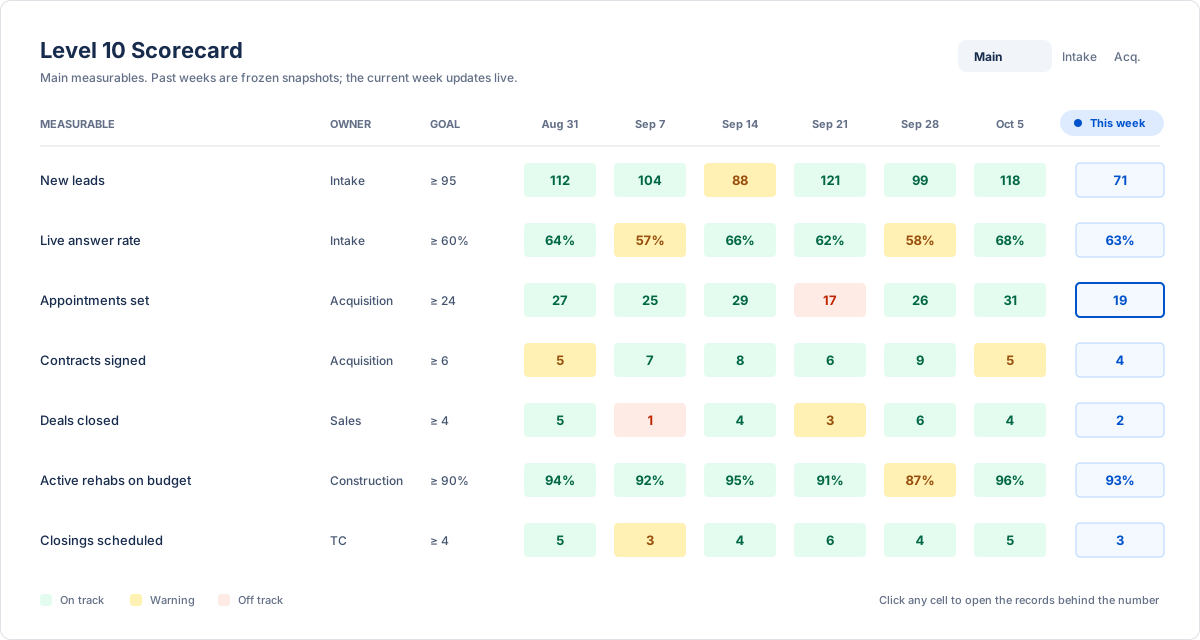
    The company runs on a weekly measurables rhythm, and the Level 10 scorecard puts that rhythm on screen. Each row is a measurable with an owner and a threshold. The current week updates live, while earlier weeks are saved as frozen snapshots. Last month's numbers never change under anyone's feet.

    Admins can edit thresholds, and the original values stay in code as a fallback. An empty or half-finished configuration can never break the board.

    Level 10 scorecard listing weekly measurables such as new leads, appointments set and deals closed, each with an owner and goal, six frozen past weeks colored on track, warning or off track, and a live current-week column.
    The Main scorecard, recreated with sample data. Past weeks are frozen; the highlighted column is live.

    Every number has a source

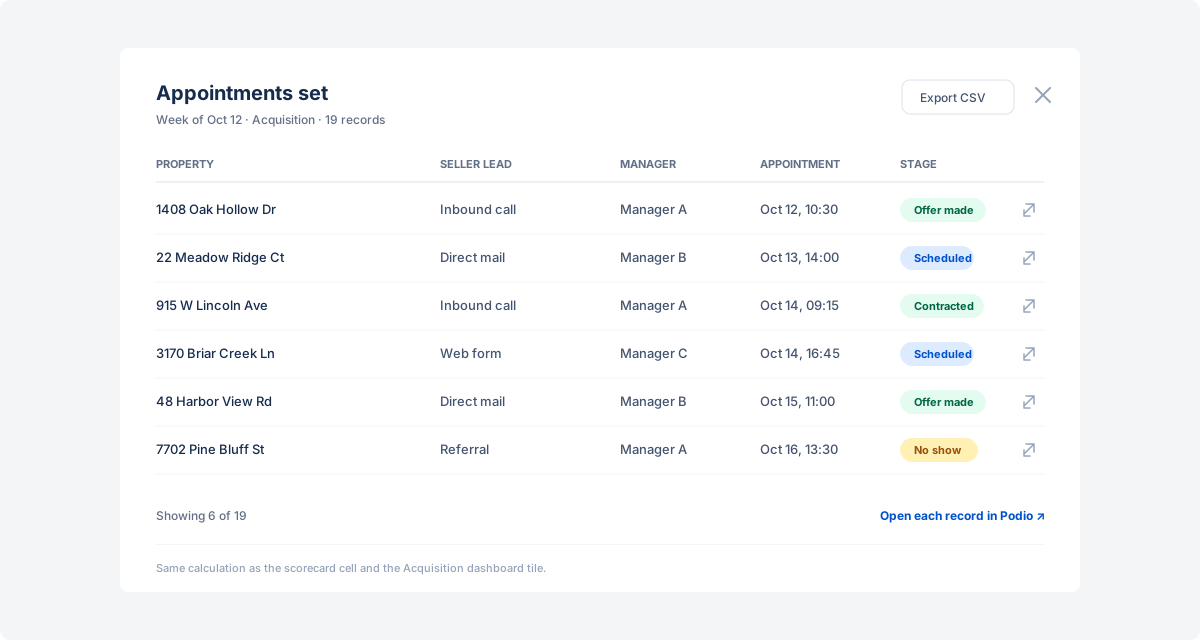
    Click any scorecard cell or KPI tile and a shared drill-down dialog lists the exact records behind it, with context columns, a CSV export and a deep link to each item in Podio. Weekly reviews became conversations about what happened, not debates about where a figure came from.

    Quarterly goals work the same way. Admins set them on a Goals page, and each widget plots actual performance against a pace line. A team sees at a glance whether it is ahead or behind for the quarter.

    Drill-down dialog for the Appointments set measurable, listing the underlying properties with lead source, manager, appointment time and deal stage, a link to each record in Podio and a CSV export button.
    A scorecard cell opened into its records, recreated with sample data.

    Frontend decisions that make it feel fast

    A dashboard is judged in its first second on screen. These choices in the React app matter as much as the data pipeline.

    Filters live in the URL

    Date ranges, people and tabs are URL parameters validated with a schema. A filtered view can be bookmarked or shared, and a malformed link falls back to defaults instead of crashing. Toggling a filter replaces history rather than stacking it, so the back button still behaves.

    One query per data slice

    Each tile has its own query with a short cache window and keeps showing the previous result while new data loads. Changing a filter never blanks the page.

    Skeletons per tile, not per page

    Labels render instantly and only the values wait. Data is also prefetched when a user hovers a link, so most navigation feels immediate.

    A glossary behind every metric

    Hover a KPI label and its exact definition appears. When a number is questioned, the answer is one tooltip away instead of a long thread.

    Results

    What changed for the business after rollout.

    • 40 to 50% less time on reporting

      The client reports spending 40 to 50% less time on reporting and data checks overall.

    • Adopted by every team

      Client feedback is that the dashboards are used and well liked across the business, from intake to closing.

    • Fresh, fast data

      Podio edits reach the dashboards in under a minute, and dashboards load in under a second.

    • One trusted source of truth

      Every team reads the same numbers, calculated the same way.

    • Weekly reviews run on live data

      The scorecard replaced manual report assembly with an always-current view anyone can drill into.

    • Self-service operations

      Admins manage goals, thresholds and data syncs without waiting on engineering.

    • A cheaper foundation to evolve

      Two legacy codebases became one documented monorepo where new dashboards follow a known pattern.

    How to apply this to your own CRM

    Whether you run Podio, HubSpot, Salesforce or a homegrown system, the same sequence works. Use it as a checklist before you write any dashboard code.

    1. 1

      Write the metric glossary first

      Agree on one definition per KPI with the people who own it. Code comes after that conversation, not before.

    2. 2

      Mirror the CRM, don't query it

      Copy the data into a database you control and point every dashboard at the copy.

    3. 3

      Store raw and flattened data

      Keep the full record plus a query-friendly projection. New metrics often need no re-sync.

    4. 4

      Design for missed events

      Webhooks will fail. Add scheduled reconciliation and a one-record refresh button.

    5. 5

      Fix your timezone rules

      Decide which calendar each report follows and test the boundaries across daylight saving changes.

    6. 6

      Give admins the controls

      Goals, thresholds and syncs belong in an admin screen, not in a developer's backlog.

    Frequently asked questions

    Can you build custom dashboards on top of Podio?

    Yes. The reliable approach is to mirror Podio data into your own database through webhooks and scheduled syncs, then build dashboards on that copy. Querying Podio's API directly from a dashboard runs into rate limits as soon as several people use it.

    How do you work within Podio's API rate limits?

    By budgeting calls. In this project, webhook-triggered fetches were debounced and batched, capped at around 240 an hour, and bulk pages were spaced about 18 seconds apart with backoff on throttling responses.

    How real-time is the data?

    In production, a Podio edit typically appears on the dashboard in under a minute. A nightly reconciliation catches calculated fields that change without a webhook, and admins can refresh any single record instantly.

    What happens if a webhook is missed?

    The nightly reconciliation backfills recent changes, and an admin can paste a Podio item URL to refresh that record on demand. For larger gaps, a date-range or full reseed rebuilds the data safely in a shadow collection.

    Does this approach work with CRMs other than Podio?

    Yes. Mirroring, reconciliation, shadow rebuilds and a shared metric glossary apply to any CRM that offers webhooks or change feeds and an API, including HubSpot and Salesforce.

    Technologies and tools

    Frontend: Vite 6, React 19 and TypeScript, TanStack Router and Query, Tailwind CSS with shadcn/ui, Recharts and Zustand. Backend: Node.js with Express 5, MongoDB with Mongoose, BullMQ queues on Redis, and JWT authentication in HTTP-only cookies. Integrations: Podio webhooks and API, AWS S3 for files and AWS SES for email.

    • React
    • TypeScript
    • Vite
    • Tailwind CSS
    • Node.js
    • Express
    • MongoDB
    • Redis
    • AWS

    Related: Software for real estate · Business intelligence · AI data analytics

    View all
    Software-Defined Global SASE Network Fabric
    Enterprise Networking

    Software-Defined Global SASE Network Fabric

    Angular Minds partnered with 21Packets to build a software-defined global SASE network fabric operating across 450+ PoPs in 247+ countries. The platform delivers quantum-safe, zero-downtime networking for Fortune 100 companies with speeds up to 100Gbps, replacing legacy MPLS and VPN infrastructure at a fraction of the cost.

    8 minutes readRead more →

    Your CRM already holds the answers

    Podio, Salesforce, HubSpot or a homegrown system: if your teams reconcile spreadsheets before every review, a real-time analytics layer on the data you already have is usually the fastest fix.